Website migration monitoring checklist
By TechDash · Published 1 September 2026 · Updated 2 September 2026
Website migration monitoring needs paired evidence from old and new URLs. The old URL should reach the intended destination, and the new URL should return the correct content, indexability, canonical, links and structured data.
Prepare the mapping and baseline before cutover. Check both sides immediately after the move, then continue while crawlers and search systems process the new URLs.
Google's current site-move guidance recommends preparing and testing the new site, creating an old-to-new URL mapping, applying server redirects and monitoring old and new URLs. It also recommends keeping redirects for at least one year.
Define the type and scope of move
A migration may change:
- Domain or subdomain
- HTTP to HTTPS
- URL paths or file extensions
- CMS or rendering system
- Site architecture
- Multiple properties consolidated into one
- Language or country structure
Some projects combine several changes. Where practical, changing one major system at a time makes diagnosis easier. Document which elements are expected to remain stable.
Create the URL mapping
The mapping is the basis of monitoring and redirect tests.
Scroll sideways to see every column.
| Old URL | Intended new URL | Page type | Priority | Intended status |
|---|---|---|---|---|
/old-category/ |
/products/ |
Category | High | Permanent redirect |
/old-product-a/ |
/products/a/ |
Product | High | Permanent redirect |
/old-guide/ |
/guides/topic/ |
Article | Medium | Permanent redirect |
/retired-page/ |
None | Retired | Low | Intentional 404 or 410, if approved |
Avoid sending every old URL to the homepage. Map each page to the closest useful equivalent and record deliberate retirements.
The representative monitoring set should include:
- Highest-traffic old URLs
- Highest-converting old URLs
- Pages with valuable external links
- One pair per important template
- Directory and pagination examples
- Language or regional examples
- Known edge cases
Use a full mapping and crawler for comprehensive migration testing. A selected-page monitor is a watchlist, not the master redirect file.
Migration monitoring timeline
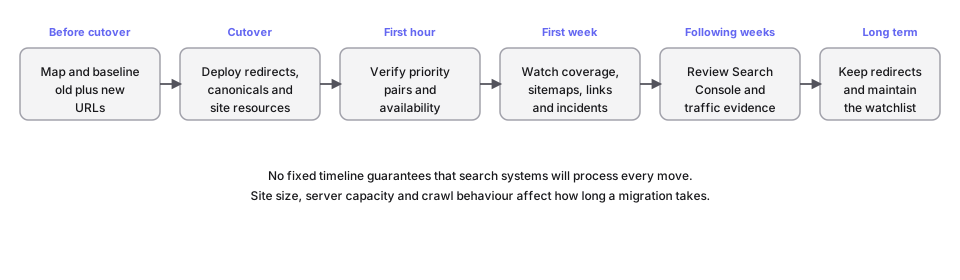
No fixed timeline guarantees that search systems will process every move. Site size, server capacity and crawl behaviour affect how long a migration takes.
Before cutover
Baseline the old site
- Record status codes and final URLs.
- Record indexability and canonical targets.
- Save titles, H1s and main content for priority pages.
- Record structured data by template.
- Crawl internal links and architecture.
- Save robots.txt and sitemap files.
- Export analytics and Search Console benchmarks.
Test the new site
- Confirm each representative new URL resolves.
- Check intended
noindexand access controls on staging. - Confirm production canonicals are ready to use the preferred hostname.
- Compare raw and rendered output where JavaScript matters.
- Check internal links point to new URLs.
- Validate hreflang targets where used.
- Validate JSON-LD and visible content.
- Check mobile rendering and important images.
TechDash supports HTTP Basic Authentication for relevant staging environments. Record intentional differences, especially staging noindex, authentication and hostnames.
Prepare resources and access
- Create the production robots.txt file.
- Build the new XML sitemaps.
- Verify old and new Search Console properties.
- Confirm DNS, TLS, CDN and hosting ownership.
- Agree rollback conditions and incident owners.
- Test desktop, Slack, Microsoft Teams or Discord alerts.
Configure the watchlist
Add both old and new sample URLs where practical. On the old URL, monitor the response and final destination. On the new URL, monitor:
- HTTP status
- Indexability
- Canonical
- Title, H1 and main content
- Structured data
- Internal-link evidence
- Hreflang where used
- Raw and rendered output where relevant
Also monitor robots.txt, sitemaps, TLS, DNS and hostname resolution when these belong in the migration plan.
TechDash supports 15-minute, hourly, daily and weekly page schedules. A migration can justify a temporary shorter interval on priority pairs. Because the application runs locally, use a computer that remains awake and online during the agreed window.
Pair the old and new checks
The two sides answer different questions. Use a paired worksheet during configuration:
Scroll sideways to see every column.
| Old URL check | New URL check | What the pair establishes |
|---|---|---|
| Redirect response | HTTP 200 response | The old route reaches a live destination |
| Final destination | Self or intended canonical | Redirect and canonical signals point consistently |
| Old title and content baseline | New title and content | Material content was not lost unintentionally |
| Old structured-data entity | New structured-data entity | Identity and important fields survived the move |
| Old internal-link sources | New internal-link sources | Navigation and contextual links now support the new URL |
| Old hreflang target | New hreflang target and reciprocity | Language relationships were updated together |
One passing side does not make the pair correct. A perfect redirect can land on a non-indexable new page. A healthy new page can remain undiscovered if important old routes and internal links were not updated.
For many-to-one consolidation, record the approved destination for every sampled old URL. For one-to-many restructuring, the master mapping must define which new page owns each old topic. Monitoring should test that decision, not make it.
Decide when to widen the investigation
Move from the selected watchlist to a full crawl or log review when:
- Several template samples fail the same condition.
- Redirect failures do not share an obvious pattern.
- Search Console reports exclusions outside the sample.
- Analytics shows a decline concentrated in an unmonitored section.
- Internal links continue to reach old URLs at scale.
- Crawler access or rendering differs across user agents.
The watchlist provides an early signal. A broader tool establishes scope.
At cutover
Old URLs
- Confirm priority old URLs return the intended permanent redirect.
- Check the final destination, not only the first response.
- Look for chains, loops and redirects to irrelevant pages.
- Confirm query strings and variants behave as planned.
- Check that intentionally retired URLs match the approved policy.
New URLs
- Confirm HTTP 200 where intended.
- Remove unintended staging
noindexand authentication. - Check canonicals use the preferred new URL.
- Confirm titles, H1s and main content.
- Validate structured data.
- Check internal links use new destinations.
- Check hreflang reciprocity and target health.
Sitewide resources
- Fetch robots.txt from the new hostname.
- Confirm important directories are crawlable as intended.
- Submit or confirm new sitemaps.
- Check sitemap members are indexable and canonical.
- Confirm DNS, TLS and preferred-host redirects.
- Confirm analytics and required tags.
The first week
- Review Critical and Warning incidents daily.
- Verify each fix against the live URL.
- Crawl old and new sites to find unmapped or linked old URLs.
- Review 404s, soft 404s and unexpected redirects.
- Check sitemap availability and membership.
- Review internal-link loss and orphan pages.
- Check Search Console inspection evidence for representative URLs.
- Watch Google-selected canonical where available.
- Compare analytics and Search Console trends with the migration baseline.
- Reduce temporary monitoring frequency only after the immediate risk has passed.
Google notes that ranking fluctuation can occur while a site move is processed. Do not treat every short-term movement as evidence of a redirect or canonical error. Investigate recorded site changes and crawl evidence first.
Following weeks
Continue to review:
- Old URLs still receiving traffic or links
- Redirect failures and chains
- New URLs excluded from indexing
- Unexpected canonical selection
- Sitemaps and crawl evidence
- Internal links that still reference old URLs
- Search clicks and impressions by old and new page groups
- Structured-data and rendering regressions after normal releases
Google recommends keeping redirects for at least one year. Updating internal links to new URLs reduces unnecessary redirects for users and crawlers.
TechDash's optional Search Console integration can import important pages and use Search Analytics and URL Inspection data. API quotas and search-processing delays still apply, so it should complement, not replace, direct Search Console review.
Incident workflow
- Confirm whether the affected URL is old or new.
- Compare expected and current state.
- Check other URLs with the same mapping pattern or template.
- Identify whether the source is redirect configuration, page template, CMS, CDN, DNS or sitemap generation.
- Fix the pattern, not only the sample.
- Use Check & Verify on the live URL.
- Run a wider crawl when the likely scope exceeds the watchlist.
- Record the cause and preventive action.
Before-and-after evidence can connect an incident to the cutover, but timing alone does not prove cause.
Full migration checklist
Preparation
- Define the move and freeze unrelated changes where practical.
- Create and review the old-to-new mapping.
- Baseline priority old URLs.
- Test representative new URLs.
- Prepare robots.txt and sitemaps.
- Verify Search Console properties.
- Assign technical and SEO owners.
- Configure and test alerts.
Cutover
- Check old redirect responses and final destinations.
- Check new URL status, indexability and canonical.
- Check preferred hostname and HTTPS.
- Fetch robots.txt and sitemaps.
- Check content, rendering and structured data.
- Confirm internal links and analytics.
- Verify the first incidents or clean checks.
Ongoing
- Crawl for missed old links and redirects.
- Review Search Console and analytics.
- Verify fixes live.
- Update external and internal links where possible.
- Keep redirects for the required period.
- Maintain a smaller long-term watchlist.
Limitations
TechDash monitors selected pages and conditions. It does not replace a complete migration crawl, server-log analysis, the master URL mapping, analytics or Search Console. It may miss an unselected URL or a temporary state between checks.
Its monitoring runs from the user's computer. If the machine sleeps or loses internet access, checks pause. Plan the runtime before relying on overnight cutover coverage.
Frequently asked questions
Should old and new URLs both be monitored?
Yes, for representative and high-value pairs. The old URL supplies redirect evidence, while the new URL supplies indexability, canonical, content and markup evidence.
How long should redirects remain?
Google currently recommends keeping migration redirects for at least one year and suggests retaining them longer for users where practical.
Can TechDash test every migration URL?
The licence does not impose a page fee, but complete migration validation is usually better handled with the full mapping and a crawler. Use TechDash for repeated checks on representative and important pairs.
Should rankings be expected to remain unchanged?
No. Google states that temporary fluctuation can occur while a move is processed. Monitor technical conditions and outcome data without promising a fixed transition.
Next step
Build the URL mapping and import representative old and new pairs before cutover. Use TechDash technical SEO monitoring for repeated checks, alongside a full crawl and Google's current site-move guidance.
Put this workflow on a desktop watchlist
TechDash runs scheduled SEO and site-health checks on your computer. It does not replace crawling, rank tracking, analytics or Search Console.