SEO monitoring checklist for agencies
By TechDash · Published 1 September 2026 · Updated 2 September 2026
Agency SEO monitoring needs a repeatable client policy, not one large list of URLs. For each client, define the pages and resources that matter, the incidents that need action, the owner, the review cadence and the evidence included in client communication.
This checklist covers onboarding, daily alerts, weekly review and offboarding. Adapt the severity and frequency to the client's site and service agreement.
Before onboarding a client
Monitoring begins with scope. Confirm:
- Which domains, subdomains and environments are included?
- Who controls the CMS, hosting, CDN and deployments?
- Which pages generate revenue, leads or important organic traffic?
- Which templates can affect many URLs at once?
- Are there planned launches, migrations or campaigns?
- Which changes are normal editorial work?
- Who can approve, investigate and fix an incident?
- Which alert channels are authorised?
- Are there data-location or credential requirements?
Do not promise complete site coverage from a selected-page monitor. State which URLs and conditions are included and which tools cover wider crawling, rankings, analytics and availability.
Build a risk-based client watchlist
Start with representative and valuable pages.
Core URLs
- Homepage
- One stable URL per important template
- Primary service or product categories
- Highest-value landing pages
- Recent launches and campaign pages
- Pages with legal or regulated copy
- Important old and new URLs during a migration
Sitewide resources
- robots.txt
- Primary XML sitemap
- Important secondary sitemaps
- SSL, DNS and domain checks when they belong in the agency's remit
Client-specific assertions
Use custom checks for conditions that generic rules cannot know:
- A phone number or compliance phrase must remain present.
- A staging banner must never appear in production.
- A tracking tag must remain in the expected page area.
- A product or service term must not disappear from a template.
- A forbidden robots.txt rule must never ship.
TechDash custom checks can look for values that should be found or not found in titles, H1s, headers, the HTML head or body, visible content, robots.txt and sitemaps. They can apply to one URL or across a site, depending on the check.
Decide the frequency
TechDash supports 15-minute, hourly, daily and weekly page schedules. Daily is the default.
Scroll sideways to see every column.
| Client risk | Starting cadence | Example |
|---|---|---|
| Temporary high risk | 15 minutes or hourly | Launch, migration or major template release |
| High-value and changeable | Hourly or daily | Product category, lead-generation landing page |
| Routine | Daily | Representative template URL |
| Stable and low risk | Weekly | Reference or policy page outside an active campaign |
The fastest interval is not automatically the best. It uses more local resources and provides little value if the service agreement allows only a next-day response.
Because TechDash runs on one licensed computer, the machine must remain awake and online for continuous coverage. The main window can be closed while the application remains in the system tray. Quitting stops monitoring.
Set severity before alerts start
TechDash uses Advisory, Warning and Critical incident levels. An agency should define these in client terms.
Critical
Use for a condition likely to need prompt action under the service agreement:
- Indexability loss on a key template
- A robots.txt block affecting an important directory
- HTTP errors across priority pages
- A migration redirect failure affecting high-value old URLs
Warning
Use for a material issue that needs investigation but may not require an interruption:
- Unexpected canonical change
- Structured-data failure on a representative template
- Main content reduction
- Important internal-link loss
Advisory
Use for a lower-risk observation or a change that often has an editorial explanation:
- Title or meta-description change
- Non-critical content edit
- A condition included for weekly review
Severity depends on the page and client. A title change on a campaign landing page may matter more than the same change on an old announcement.
Assign alert routes and owners
Desktop notifications suit the operator using the TechDash computer. Slack, Microsoft Teams and Discord webhooks can route incidents to a wider team.
For each route, document:
- Which severities are sent?
- Who acknowledges an alert?
- Who investigates technical causes?
- Who can contact the client?
- What is the response target?
- When is an issue escalated to hosting or development?
- Who confirms recovery?
Do not send every Advisory into a busy client channel. Keep internal triage separate from client communication unless the contract calls for direct alerts.
Establish and review the baseline
The first successful check establishes the state against which later changes may be compared. Review it rather than assuming that the starting condition is correct.
- Confirm intended indexability.
- Confirm canonical targets and planned exceptions.
- Check representative titles, H1s and main content.
- Confirm robots.txt and sitemap availability.
- Review structured data on key templates.
- Record intentional redirects.
A monitoring tool cannot tell when an existing problem began if it first sees the page after the problem is present.
Daily incident routine
- Review new Critical incidents first.
- Confirm whether the change was planned.
- Examine before-and-after evidence.
- Check the likely scope using more monitored pages or a full crawl.
- Assign the incident to the appropriate owner.
- Fix the template, content or configuration source.
- Use Check & Verify against the live page.
- Record the outcome and client communication where required.
Do not close an incident solely because a developer says the fix was deployed. Caches, configuration and release failures can leave the live result unchanged.
Weekly portfolio review
The weekly review should improve both client work and the monitoring system.
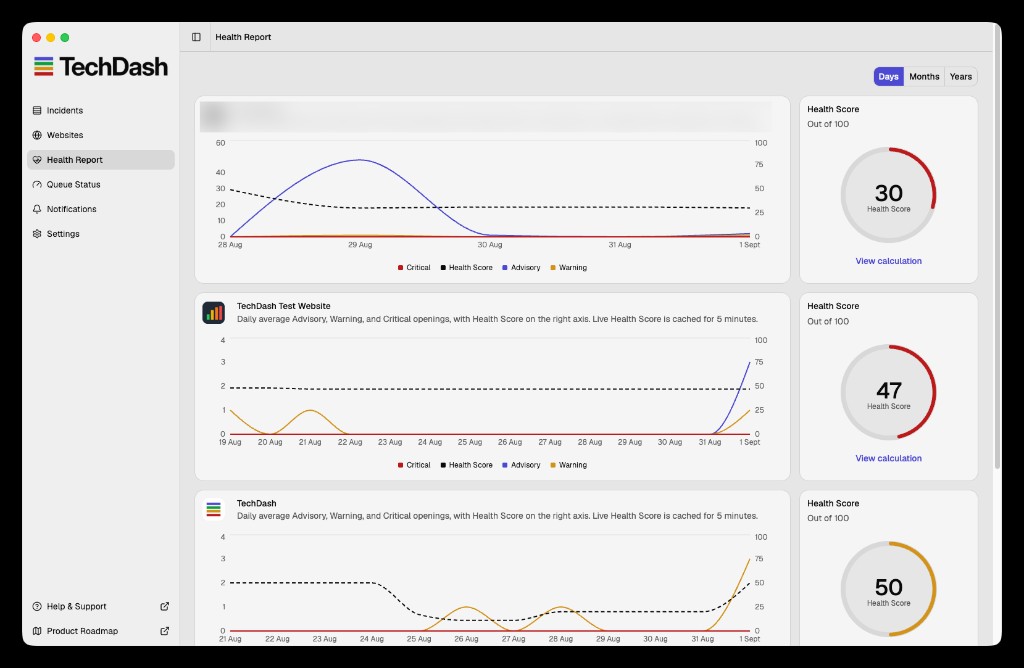
- Sort sites using the Health Report and inspect the issues behind the score.
- Review unresolved Critical and Warning incidents.
- Look for repeated failures across clients using the same platform.
- Add pages introduced by launches, campaigns or new templates.
- Remove or reclassify retired URLs.
- Review ignored checks and confirm the reason still applies.
- Check queue pressure and local computer load.
- Reduce unnecessary frequency.
- Test notification destinations.
- Identify one client-facing insight or preventive action.
TechDash's Health Report ranks sites using severity-weighted open issues. It is an operator view, not a polished client PDF. Use the underlying incident evidence to write the client update.
Client reporting
A useful incident note contains:
- Affected URL or template
- Condition before and after
- Time detected
- Whether the change was planned
- Scope found during investigation
- Action taken
- Live verification result
- Any preventive change to tests or monitoring
Avoid claiming that an incident caused a ranking or traffic change unless the evidence supports that conclusion. Use Search Console, analytics and rank tracking for outcome data.
Local data and agency operations
TechDash stores the monitored site list, crawl history, page HTML and screenshots on the user's computer rather than in a TechDash cloud account. That can simplify some client-data conversations, but the agency still needs its own controls:
- Restrict access to the monitoring computer.
- Protect backups.
- Review what is copied into webhooks and client channels.
- Store Search Console and other credentials securely.
- Define retention and deletion during client offboarding.
TechDash connects to monitored websites and to optional services such as Search Console, DNS, RDAP, TLS and alert destinations when those features are used. Local-first does not mean no network activity.
Offboarding checklist
- Export or record the incident history the contract requires.
- Remove client notification webhooks.
- Disconnect Search Console if no longer authorised.
- Remove monitored pages and site resources.
- Delete retained local data according to policy.
- Remove credentials and test that access has ended.
- Record the offboarding date and responsible person.
Use the current privacy and data support guidance for product-specific retention and deletion steps.
Full agency checklist
Client setup
- Scope domains, environments and services.
- Name the client and agency owners.
- Choose one URL per important template.
- Add high-value exceptions.
- Add robots.txt and sitemaps.
- Add client-specific custom assertions.
- Review the initial baseline.
Alert policy
- Map conditions to Advisory, Warning and Critical.
- Set page frequencies by risk.
- Configure approved alert routes.
- Test each route.
- Document acknowledgement and escalation.
Ongoing work
- Review Critical incidents promptly.
- Run a weekly portfolio review.
- Verify fixes against the live page.
- Add new templates and launches.
- Review ignored checks and false positives.
- Check local queue and computer health.
- Report facts without unsupported attribution.
Frequently asked questions
Can TechDash monitor multiple client sites?
Yes. The licence does not apply a per-site or per-page fee, but practical capacity depends on the licensed computer and selected schedules.
Can colleagues receive alerts?
Yes. Webhooks can send notifications to Slack, Microsoft Teams or Discord. The application itself runs on one licensed computer at a time.
Is there a client-ready PDF report?
The current TechDash agency page describes the Health Report as an operator tool and states that a polished client PDF is not the current product. Build client communication from the incident evidence.
How do we avoid alert fatigue?
Monitor fewer, more representative URLs at first. Route only relevant severities, document expected changes and review noisy or ignored checks weekly.
Next step
Turn this checklist into the standard monitoring section of client onboarding. Review TechDash for SEO agencies and the monitoring workflow guide before deciding which clients and pages belong in the first rollout.
Put this workflow on a desktop watchlist
TechDash runs scheduled SEO and site-health checks on your computer. It does not replace crawling, rank tracking, analytics or Search Console.