Structured data monitoring: detect broken JSON-LD
By TechDash · Published 1 September 2026 · Updated 2 September 2026
Structured data monitoring checks whether JSON-LD is present, parses correctly and still describes the intended entities and fields. It can identify a template that stops emitting markup, a syntax error, a changed product value or an entity that no longer matches the visible page.
Valid JSON-LD does not guarantee a rich result. Search engines apply feature-specific requirements and decide how results appear. Monitoring supplies evidence about the page, while current validation tools and search documentation supply the eligibility rules.
Four kinds of structured-data failure
1. Missing markup
A component, template condition or rendering error removes the JSON-LD block. The page may still look correct to a visitor.
2. Invalid syntax
A missing comma, quote or bracket prevents the JSON from parsing. A CMS field containing unescaped content can produce this after an otherwise safe editorial update.
3. Changed graph or fields
The JSON parses, but an entity type, identifier, URL, price, availability, author or other important value changes. The change may be intentional or a regression.
4. Valid but misleading or incomplete markup
The syntax passes, but the data does not match visible content or omits properties needed by the relevant search feature. Google's structured-data guidelines require markup to represent visible page content and remain accurate and current.
Monitoring should distinguish these failure types. A generic “schema changed” message is less useful than evidence showing whether the block disappeared, stopped parsing or changed one field.
Parsing, validity and eligibility are different
Scroll sideways to see every column.
| Layer | Question | Useful tool |
|---|---|---|
| JSON parsing | Is the JSON syntactically valid? | Parser or monitor |
| Schema structure | Are types and properties used coherently? | Schema validator |
| Search feature | Does the markup meet a search engine's current requirements? | Rich Results Test and feature documentation |
| Page consistency | Does the markup match visible content? | Human review and page checks |
| Search outcome | Did a search feature appear or change? | Search Console and result observation |
Google recommends its Rich Results Test for supported search features and a Schema.org validator for general schema validation. A passing test does not guarantee that a rich result will be shown.
Choose representative templates
Monitor at least one stable URL for each template that emits JSON-LD:
- Organisation or local business pages
- Product details
- Category pages if they emit list markup
- Articles
- Videos
- Events
- Breadcrumbs
- FAQs where markup is genuinely used and eligible
Add commercially important exceptions. A product with unusual variants or an article with multiple authors may exercise different code paths from the template sample.
Do not add unsupported schema solely to create more monitoring coverage. Markup should describe the page's real content and purpose.
Establish the baseline
Before enabling change alerts:
- Fetch the live rendered page.
- Confirm every JSON-LD block parses.
- Identify the main entity and stable identifier.
- Compare important values with visible content.
- Run the current Rich Results Test where applicable.
- Run general schema validation where useful.
- Record intended exceptions and optional fields.
The first observed state may become the comparison point. If it is already incomplete, monitoring will preserve an incomplete baseline. Review it manually.
Decide which changes matter
High-priority examples
- Product or article markup disappears across a template.
- JSON-LD stops parsing.
- Canonical entity URLs point to staging or another domain.
- Product identity, price or availability becomes inconsistent with visible content.
- A required property for a relied-upon search feature disappears.
Lower-priority or expected examples
dateModifiedchanges after a real edit.- Price or availability changes with the visible product state.
- Optional descriptive text changes.
- Entity order changes without altering meaning.
Normal dynamic fields need thoughtful comparison. Alerting on every price or timestamp change may create noise, while ignoring all graph changes may hide a broken template.
Identify fields by template
Do not use one field list for every entity. Record the page's actual purpose and the current search-feature documentation.
Scroll sideways to see every column.
| Template | Stable values worth checking | Values that may change normally |
|---|---|---|
| Product | Entity type, product URL, identifier and currency | Price, availability, ratings and offers |
| Article | Entity type, headline source, author identity and canonical URL | Modification date and some image choices |
| Local business | Entity identity, URL, location and contact source | Opening hours and temporary service details |
| Video | Entity type, content URL or embed relationship | Upload or modification metadata when content changes |
| Breadcrumb | Position order and destination URLs | Labels after an approved navigation rename |
This is a monitoring worksheet, not a list of required schema properties. Requirements vary by feature and can change. Follow the current search-engine documentation for the specific type.
Stable identifiers deserve particular care. If a template creates a different entity ID on every render, change monitoring becomes noisy and connected graph data may become harder to interpret. Fix deterministic generation at the source rather than ignoring the field.
How TechDash handles structured-data checks
TechDash lists structured-data changes and structured-data validity among its shipped checks. Its support area also covers structured data, product and video checks. Review the current structured-data check documentation for the evidence and scope of each check.
TechDash stores crawl history locally and can open incidents with before-and-after evidence. Advisory, Warning and Critical severity can be used to route changes. Notifications can go to the desktop, Slack, Microsoft Teams or Discord.
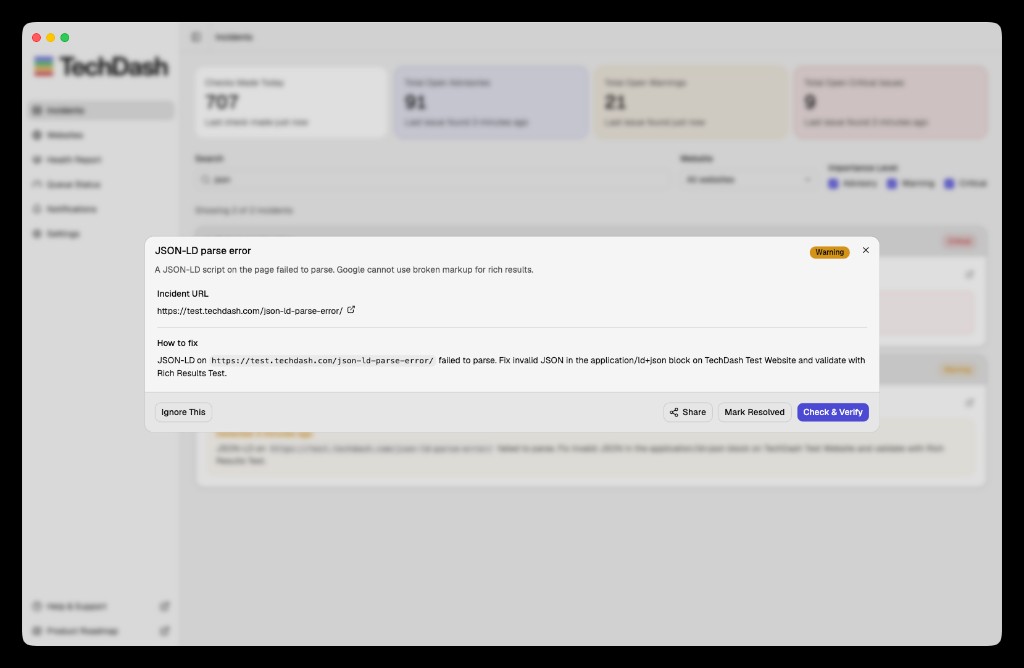
Do not assume that a general validity check verifies every requirement for every rich-result type. Search documentation changes, and feature eligibility may depend on content outside the JSON-LD block.
Monitor raw and rendered output where needed
Some sites emit JSON-LD in the initial HTML. Others add or alter it with JavaScript. A rendering failure can therefore affect markup even when the server response contains valid data.
For JavaScript-dependent templates:
- Compare raw and rendered HTML.
- Confirm the block is present after rendering.
- Check whether consent or personalisation changes output.
- Test representative mobile rendering when relevant.
- Confirm the monitoring method sees the same state intended for crawlers.
TechDash includes raw-versus-rendered divergence and HTML-head checks in its documented coverage. Rendering work uses more local resources, so apply it where it answers a real question.
Deployment workflow
Before release
- Validate the template in staging.
- Compare JSON-LD with visible content.
- Test unusual field values and escaping.
- Confirm stable entity identifiers and URLs.
- Add representative pages to monitoring.
- Record the intended baseline.
After release
- Check presence and parsing on production.
- Compare raw and rendered output where needed.
- Inspect important changed fields.
- Run current external validation.
- Check more URLs when a template sample fails.
- Fix the source template or data transformation.
- Use Check & Verify against the live page.
Following days
- Review Search Console enhancement reports where available.
- Check pages populated with real content after release.
- Review recurring warnings and noisy dynamic fields.
- Add preventive tests to CI where possible.
Monitoring and CI serve different stages. A schema unit test may validate generated JSON before release. Production monitoring can observe CMS data, rendering and template behaviour afterwards.
Incident response
- Identify the affected page and entity type.
- Determine whether the block is missing, invalid or changed.
- Compare the markup with visible content.
- Run the relevant current validator.
- Check more pages from the same template.
- Find the source in data, template, escaping or rendering.
- Fix and deploy.
- Rerun the live check.
- Review Search Console later for search-engine evidence.
Do not paste sensitive staging data into third-party validators without approval. A local parser or authenticated staging test may be more appropriate before release.
Structured-data monitoring checklist
- One representative URL selected per JSON-LD template
- Main entity and identifier documented
- Initial JSON parses
- Markup matches visible content
- Current search-feature rules checked
- Raw and rendered output checked where relevant
- Important stable fields identified
- Dynamic fields excluded or handled deliberately
- Severity and owner assigned
- Alert route tested
- Production fix verified
- Search Console reviewed after material changes
Limitations
Monitoring cannot guarantee a rich result or ranking effect. Search engines decide eligibility and presentation, and their requirements change. A monitor may also miss markup on an unselected template or a temporary rendering failure between checks.
TechDash's checks run from the user's computer, so the machine and internet connection must remain available. The app provides structured-data evidence but does not replace the current Rich Results Test, general schema validation, Search Console or a human consistency review.
Frequently asked questions
Does valid JSON-LD guarantee a rich result?
No. Valid syntax is only one condition. The page must meet current feature and content requirements, and search engines decide whether to show an enhanced result.
Should every field change open an alert?
No. Dynamic values such as price, availability and modification dates may change normally. Choose fields and severity according to business risk.
Should structured data be monitored in raw or rendered HTML?
Use the version that reflects how the site emits markup. JavaScript-dependent implementations may require rendered checks as well as raw-source review.
Can Search Console replace page monitoring?
No. Search Console provides search-engine reports and may show issues after processing. Page monitoring can record the live template change earlier, subject to its schedule and coverage.
Next step
Select one representative URL for each JSON-LD template and validate the baseline. Then review TechDash structured-data checks and Google's structured-data introduction before deciding which changes should alert the team.
Put this workflow on a desktop watchlist
TechDash runs scheduled SEO and site-health checks on your computer. It does not replace crawling, rank tracking, analytics or Search Console.