SEO change monitoring software that alerts you before traffic drops
TechDash watches the pages that matter and tells you when noindex, canonicals, robots.txt, metadata, schema or content change in ways that can damage search visibility. Rank trackers report the damage later. TechDash shows the change itself.
SEO change monitoring, defined
SEO change monitoring is the practice of watching important URLs for the technical changes that can quietly remove them from search. The site still loads. The design still looks fine. A template added noindex, a canonical now points at the homepage, or robots.txt started blocking a directory.
TechDash is desktop software for that job. It runs the checks from your computer, stores crawl history locally, and opens an incident with before/after evidence when something important changes.
What TechDash checks
- Indexability: robots meta noindex, X-Robots-Tag, indexability state, conflicting directives
- Canonicals: URL and target changes that point valuable pages somewhere unexpected
- robots.txt availability and content changes
- Titles, H1s, meta descriptions and main-content collapse
- Structured data changes and JSON-LD validity
- Redirects, soft 404s, HTTP errors, TLS, DNS and domain problems
- Sitemaps, hreflang, internal links and optional Google Search Console signals
You can also add custom checks: alert if a phrase disappears, a tracking tag goes missing, or a word you never want published appears.
Examples that do not look like outages
- Noindex added. A CMS default or header change sets
noindex,followon a category that used to be indexable. - Canonical changed. A product URL that used to canonicalize to itself now points at
/. - robots.txt block. A deploy ships
Disallow: /blog/or a staging rule onto production. - Title removed. A template renders “Untitled page” after a merge.
- Schema broke. JSON-LD stops parsing, or a required field disappears from Product markup.
- Content collapsed. The main body drops to a thin stub while the chrome still looks complete.
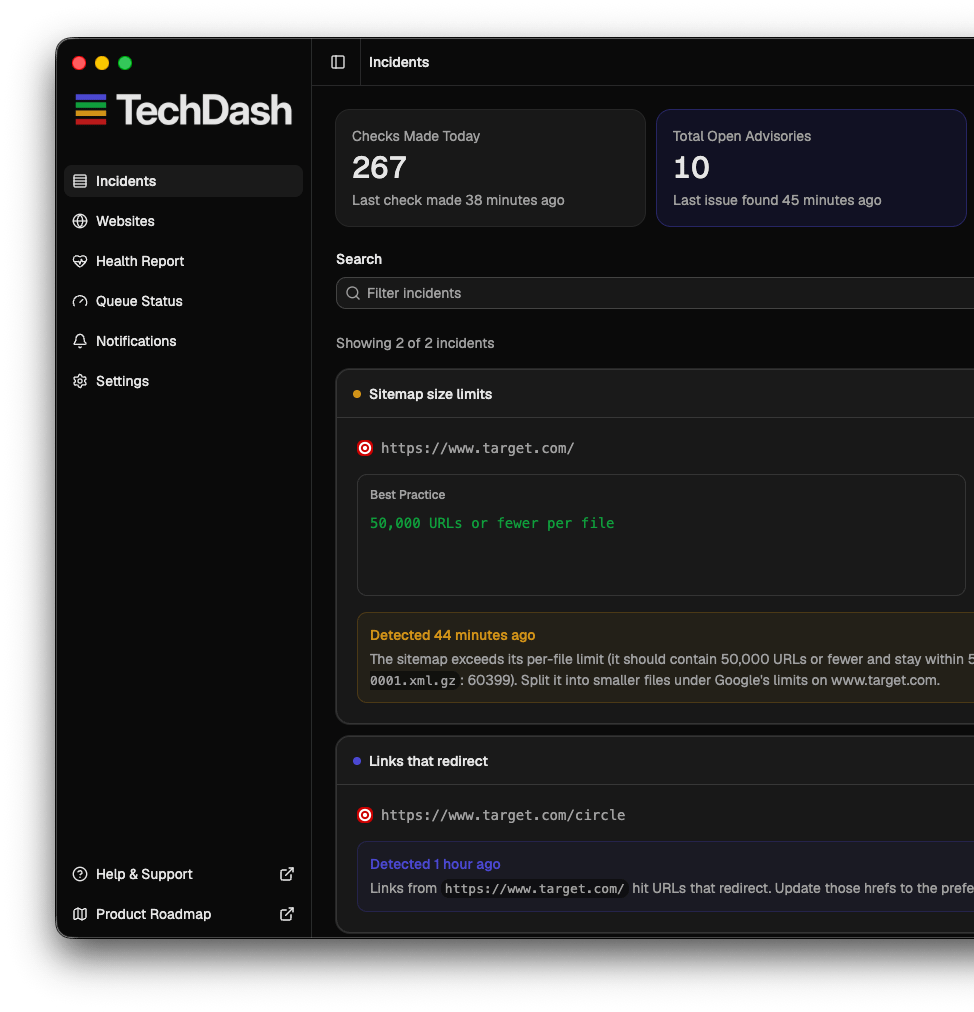
Why rank tracking and generic change monitors are a different job
A rank tracker answers “did this query move?” A visual change monitor answers “did pixels move?” SEO change monitoring answers “did the signals search engines use just change?” Those are useful tools. They are not substitutes for catching an accidental noindex the afternoon it ships.
Read website monitoring vs rank tracking if you need to explain the difference to a client or a developer.
Why desktop and local data matter
Agencies and in-house teams often do not want another hosted crawler holding client URLs and page HTML. TechDash keeps that data on the machine you already use. Licence validation does not send TechDash your site list.
Questions
What is SEO change monitoring?
It is watching important URLs and site files for technical changes that can hide or weaken pages in search: noindex, canonicals, robots.txt, titles, schema, redirects and content loss. It is not the same as rank tracking.
Why is rank tracking too late?
A rank tracker tells you a page slipped after Google has already recrawled and reacted. SEO change monitoring shows the regression when it ships, so you can fix it before the traffic graph moves.
Are scheduled crawls enough?
A monthly or weekly full crawl is useful, but a noindex can ship on a Friday afternoon and sit unnoticed until the next crawl. TechDash can check critical URLs every 15 minutes, hourly or daily from your machine.
What does TechDash check?
78 shipped checks covering indexability, availability, metadata, structured data, sitemaps, robots.txt, links, images, Search Console signals, infrastructure and more, plus custom checks for phrases only you care about.
Why run this on a desktop instead of the cloud?
Crawl history, screenshots and client URL lists stay on your computer. You are not paying per extra site or sending the portfolio through another hosted crawler.
How much does it cost?
A one-off desktop licence with 12 months of updates and support. Renewing later is optional. There is no monthly monitoring subscription.
Buy the desktop licence. Keep the crawl data local.
One-off licence, 78 shipped checks, Slack/Teams/Discord or Daily Digest alerts, and no monthly monitoring subscription. $179 one-off.