What is SEO change monitoring?
By TechDash · Published 1 September 2026 · Updated 2 September 2026
SEO change monitoring is the practice of checking important web pages and site resources for changes that may affect crawling, indexing, interpretation or search presentation. It can identify a new noindex directive, an altered canonical, a robots.txt rule, missing structured data, a changed title or a collapsed block of main content.
The purpose is early evidence, not certainty. A monitor can show that a condition changed. It cannot guarantee that rankings or traffic will be affected, and it does not remove the need for technical investigation.
A practical definition
SEO change monitoring has four parts:
- A defined subject: selected URLs, templates or site resources.
- A stored baseline: the condition seen during an earlier successful check.
- A repeatable test: a rule that can run on a schedule.
- An action process: evidence, an owner and a way to verify the response.
Without a baseline, a tool can describe the current state but may not know what changed. Without a rule, every harmless edit can become an alert. Without an owner, even an accurate incident can remain unresolved.
What SEO changes are worth monitoring?
The useful list depends on the site, but several groups appear repeatedly.
Indexability
Page-level and header-level directives can change whether a search engine is asked to index a URL. Relevant checks include:
- Robots meta
noindex X-Robots-Tagheaders- Conflicting or duplicate directives
- A page moving from an intended indexable state to a non-indexable state
A page can return HTTP 200 and look normal to a visitor while carrying a noindex directive. Availability monitoring alone will not explain that condition.
Canonicals
A canonical change may be intentional, especially during consolidation or a migration. It may also be a template regression. Useful monitoring records both the previous and current target so an SEO can review the difference.
Check the canonical's presence, target and target health. Do not treat every non-self-canonical as an error. Some pages are intentionally canonicalised elsewhere.
Robots.txt and sitemaps
robots.txt can alter crawler access across an entire section. Monitoring can cover the file's availability, content changes and specific rules that must or must not appear. XML sitemap checks can cover availability, membership, non-indexable members, size and lastmod quality.
robots.txt manages crawling, not reliable removal from search results. Google's robots.txt guidance recommends noindex or access controls when a page must be kept out of Google.
Content and metadata
Title tags, H1 headings, meta descriptions and main content can change through editorial work, template releases or CMS defaults. A useful monitor should distinguish an expected edit from a material regression.
Examples include:
- A title falls back to “Untitled page”.
- The H1 is removed from one template.
- The main body becomes a thin stub after a component failure.
- A required product attribute disappears.
- A tracking tag or legally required phrase is removed.
Structured data
JSON-LD can stop parsing, disappear from rendered output or lose an important entity or property. Monitoring can identify a changed graph or invalid syntax, but validity does not guarantee a rich result. Search engines decide eligibility, and markup should remain consistent with visible page content.
Availability and infrastructure
SEO monitoring can also include HTTP errors, redirects, soft 404s, TLS certificate health, DNS and domain-registration signals. These overlap with website operations, but they matter when they restrict crawler or user access.
Internal links, hreflang and rendering
Template changes can reduce inbound internal links, create links to errors, alter hreflang annotations or produce a difference between raw and rendered HTML. These checks are especially useful when a site depends on client-side rendering or repeated components.
How the monitoring loop works
The process should return to verification after a fix. Closing a ticket or merging code is not evidence that the live page now passes.
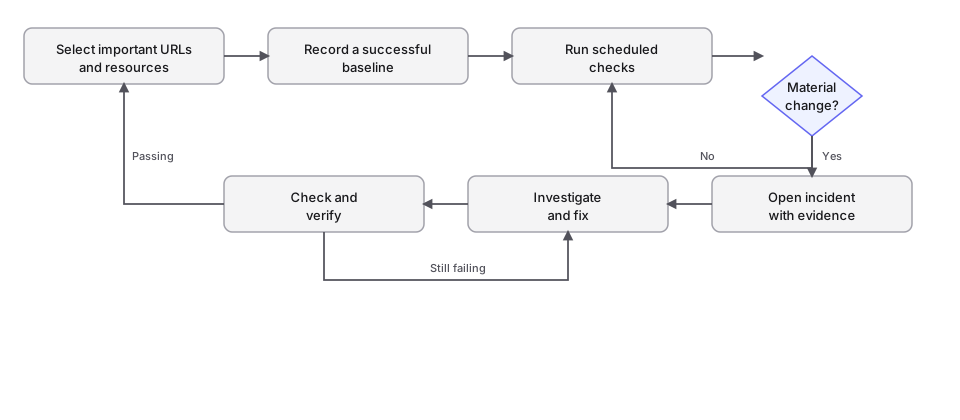
The first successful crawl usually establishes the comparison point. An incident becomes meaningful when a later check differs from that baseline or fails a defined condition.
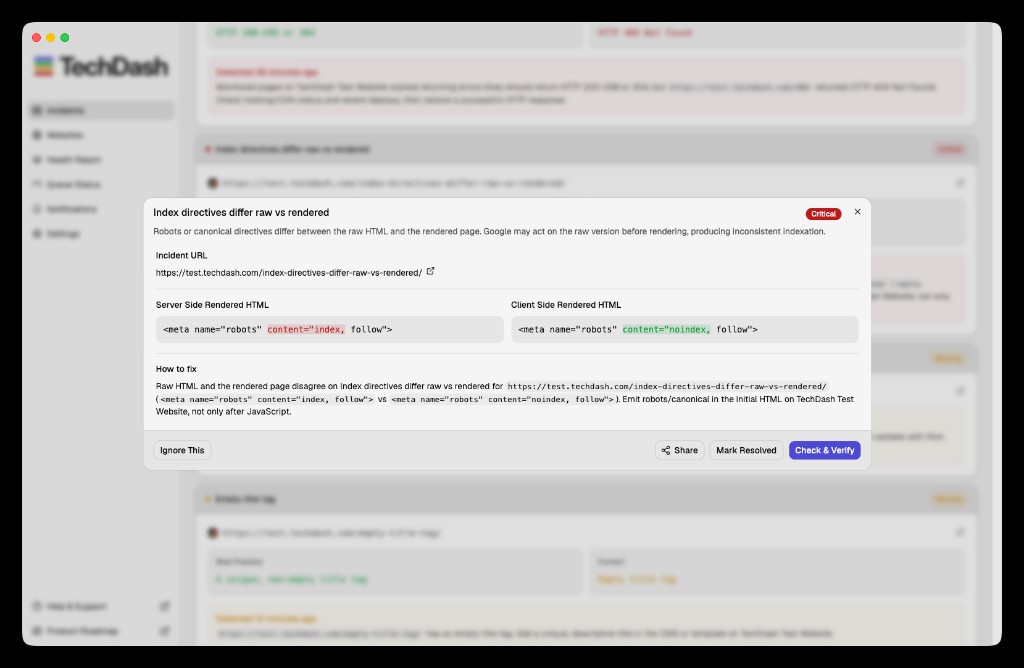
TechDash follows this model. It runs scheduled checks, records before-and-after evidence and lets the user rerun a check through Check & Verify. Optional recovery notifications can report when a previously failing condition passes again.
SEO change monitoring compared with adjacent tools
Scroll sideways to see every column.
| Tool or practice | Main question | Useful for | What it may miss |
|---|---|---|---|
| SEO change monitoring | Did an important SEO condition change? | Early evidence on selected pages and resources | Unmonitored URLs and conditions |
| Rank tracking | Did a selected query move in search results? | Search visibility trends and competitor movement | The site change that contributed to movement |
| Web analytics | Did visits or conversions change? | User behaviour and business outcomes | The technical cause of a decline |
| Full-site crawling | What can a crawler discover across the site now? | Broad audits, architecture and investigation | Short-lived changes between crawls |
| Uptime monitoring | Is the page or service available? | Outages, latency and operational response | Pages that load with harmful SEO settings |
| Visual change detection | Did the rendered appearance change? | Layout, visual evidence and selected regions | Invisible technical directives |
| CI testing | Did the encoded release tests pass? | Preventing known regressions before deployment | CMS, CDN or configuration changes outside the pipeline |
These tools can support one another. Monitoring should fill a defined gap, not duplicate every alert already produced elsewhere.
Why rank tracking is later in the chain
Rank tracking observes search results. SEO change monitoring observes the website or its search-related signals. The sequence may look like this:
- A release changes a canonical.
- A monitor records the change.
- A search engine recrawls and processes the page.
- Search visibility may change.
- A rank tracker or Search Console may show the result.
The word “may” matters. Rankings move for many reasons, including competitors, query demand, search-system changes and normal measurement variation. A recorded site change is evidence, not proof of causation.
Read website monitoring vs rank tracking for a fuller comparison.
How often should pages be checked?
Frequency should follow the cost of delay and the likelihood of change.
Scroll sideways to see every column.
| Page or resource | Possible starting cadence | Reason |
|---|---|---|
| Revenue-critical template | Every 15 minutes or hourly during risk windows | A regression may affect many valuable URLs |
| Homepage or major landing page | Hourly or daily | High visibility with moderate change frequency |
| Normal content page | Daily | Enough for routine editorial or template changes |
| Stable legal or reference page | Weekly | Lower change frequency unless a campaign or release is active |
| Launch or migration sample | Temporarily more frequent | Risk is concentrated around cutover |
These are starting points, not universal rules. The computer or service running the checks must also keep up with the workload.
TechDash scheduling supports every 15 minutes, hourly, daily and weekly. Daily is the default. Because TechDash runs locally, monitoring pauses when the computer sleeps or loses internet access and resumes when the environment is available again.
What makes an alert useful?
An alert should answer enough of the following questions to support a decision:
- Which site and URL are affected?
- Which condition failed?
- What was observed before?
- What is observed now?
- How severe is the incident?
- Was the change expected?
- Who owns the response?
- How will the fix be verified?
Severity should relate to consequence. A new noindex on a major landing page may be Critical. A changed meta description may be Advisory if it was part of normal editorial work. The same technical condition can deserve different severity on different sites.
TechDash uses Advisory, Warning and Critical levels. Alerts can be sent through desktop notifications, Slack, Microsoft Teams or Discord. Sending every Advisory to a busy release channel is likely to create noise. Route only incidents that need prompt attention.
Choosing the first URLs
Do not begin by monitoring every crawlable URL at the shortest interval. Start with pages that represent risk:
- Homepage
- One important URL per template
- High-revenue category or product pages
- High-traffic landing pages
- Recently launched pages
- Migration samples
- Legal or campaign pages with mandatory copy
- robots.txt and the primary XML sitemap
Google Search Console can help identify pages with search demand. TechDash can optionally connect to a verified property, import important pages and use Search Analytics and URL Inspection data. The website checks also work without Search Console.
Limits of SEO change monitoring
Monitoring only sees the pages, resources and conditions included in the setup. It can miss:
- A new orphan URL that was never added
- An issue outside the monitored templates
- A rendering condition that the chosen check does not cover
- A temporary change between scheduled checks
- A search-engine interpretation that cannot be inferred from the page alone
Local monitoring adds another practical limit. The machine must be awake, connected and able to process the queue. TechDash has no licence-level site or page charge, but capacity depends on the computer and schedule.
Monitoring also does not replace judgement. An altered canonical, robots rule or title may be intentional. Evidence should lead to review, not an automatic rollback without context.
A simple way to start
- Choose five important URLs and one site resource.
- Write down the condition that matters on each.
- Set daily checks unless a shorter response time is justified.
- Establish a successful baseline.
- Route only high-severity incidents to the main team channel.
- Review the first week for noise or missed conditions.
- Verify every fix against the live page.
- Expand only when the first set is useful.
For a complete operating process, continue with how to monitor website changes that affect SEO.
Frequently asked questions
Is SEO change monitoring the same as an SEO audit?
No. An audit investigates a site at a point in time, often with broad crawl coverage. Change monitoring repeats defined checks and compares results over time. Teams may use both.
Does monitoring prevent traffic loss?
It can shorten the time between a change and its discovery. It cannot guarantee that a change will be found before a search engine processes it, or that fixing the change will prevent a traffic effect.
Do I need to monitor every URL?
Not necessarily. Representative template pages and commercially important URLs are a practical starting point. Broader crawls can cover discovery.
Can monitoring run on staging?
That depends on access. TechDash supports HTTP Basic Authentication for relevant staging and development sites, with Chrome, TechDash or custom user-agent options in that workflow.
Does TechDash send crawl data to a cloud account?
TechDash states that monitored URLs, page HTML, screenshots and crawl history remain on the user's computer. Connections to websites and optional services such as Search Console, DNS, RDAP, TLS and notification destinations still require network access.
Next step
Review TechDash SEO change monitoring if a local, incident-led workflow fits your requirements. Start with a small risk-based watchlist and test the evidence and alert routing before expanding it.
Put this workflow on a desktop watchlist
TechDash runs scheduled SEO and site-health checks on your computer. It does not replace crawling, rank tracking, analytics or Search Console.