Noindex, canonical and robots.txt monitoring
These three changes can hide a page from search without taking the site down. TechDash watches them on the URLs and site files you choose, then shows the before/after so you can act the same day.
Why these issues are dangerous
Users still see the page. Uptime monitors stay green. A visual diff may even look like a minor template tweak. Search engines, meanwhile, were just told not to index the URL, to treat another URL as the canonical, or to stay out of a directory.
Noindex monitoring
TechDash watches robots meta noindex, X-Robots-Tag noindex, indexability state and conflicting directives. A typical incident: index,follow becomes noindex,follow after a CMS default or an environment flag leaks to production.
After an alert, decide the intended index URL, remove the accidental directive, align sitemap and internal links, then verify. The longer a noindex sits, the more likely Google is to drop the URL.
Canonical change alerts
Canonical checks watch the declared canonical URL and its target. A common regression: /products/widgets/ used to canonicalize to itself and now points at / because a template helper received an empty path.
Treat every unexpected canonical as intentional-or-not. If it is a mistake, restore a single direct, usable canonical and re-check the URL. If it is a consolidation, make sure redirects, hreflang and the sitemap agree.
Robots.txt monitoring
TechDash watches robots.txt availability and content. The scary cases are familiar: a staging Disallow: /, a plugin writing a new rule, or a sitemap line that disappeared. Read the deeper robots.txt monitoring guide when you need the operational detail.
What to do after an alert
- Read the before/after. Confirm the change is real, not a fetch failure.
- Ask whether anyone meant to ship it. Releases and CMS edits are the usual sources.
- Fix the source (template, header, robots file), not a one-off HTML patch if the template will overwrite it.
- Verify in TechDash. Then use URL Inspection if you need Google’s current view.
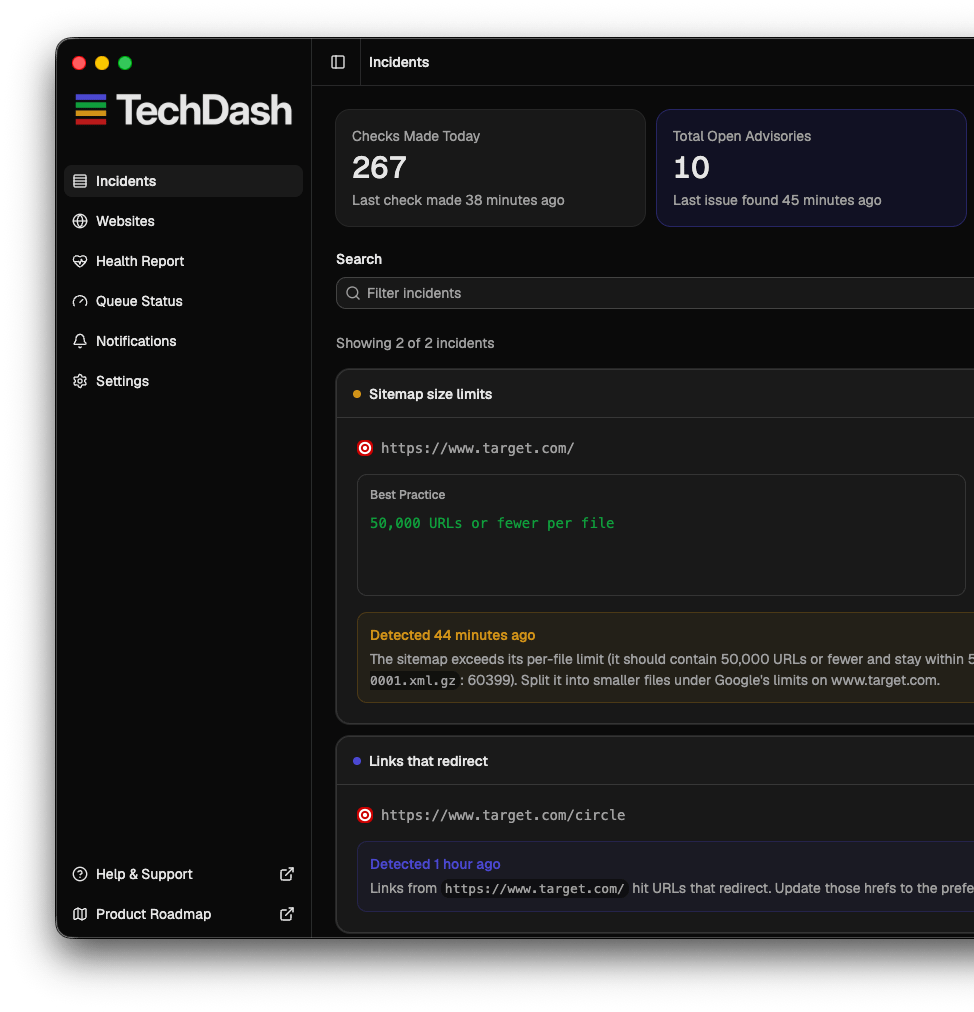
Job-specific screenshots of these three incident types are still being produced. Until then, the incidents screen shows how TechDash lists severity and affected URLs.
Questions
What is a noindex alert?
A noindex alert fires when a page that was indexable starts sending a robots meta noindex, an X-Robots-Tag noindex, or another conflicting index directive. TechDash treats that as a first-class incident, not a generic HTML diff.
Why do canonical changes matter?
A new canonical target tells search engines which URL should receive the signals. If a product or article suddenly canonicalizes to the homepage or a sibling, you can lose rankings without a 404.
How often is robots.txt checked?
robots.txt is a site resource with its own cadence. TechDash watches availability and content changes so a Disallow that landed in a deploy is not waiting for your next full crawl.
What should I do after an alert?
Confirm whether the change was intentional. If not, revert the directive, canonical or robots rule, then run Check & Verify in TechDash. Do not wait for Search Console to confirm the recovery before you fix production.
Can this happen on only some templates?
Yes. That is why you monitor representative URLs for each important template, not a single homepage ping.
Buy the desktop licence. Keep the crawl data local.
One-off licence, 78 shipped checks, Slack/Teams/Discord or Daily Digest alerts, and no monthly monitoring subscription. $179 one-off.